

Introduction
SCIM (System for Cross-domain Identity Management) is a standardized protocol that simplifies the automation of user provisioning and management across multiple platforms. By integrating SCIM with your preferred Identity Provider (IdP), such as Okta, you can securely and efficiently manage user creation, updates, and de-provisioning within Statsig. We currently only offer an Okta SCIM integration.How To Obtain SCIM Auth Key
You must be a Statsig Organization Admin in order to enable SCIM.
The SCIM key includes the
scim prefix.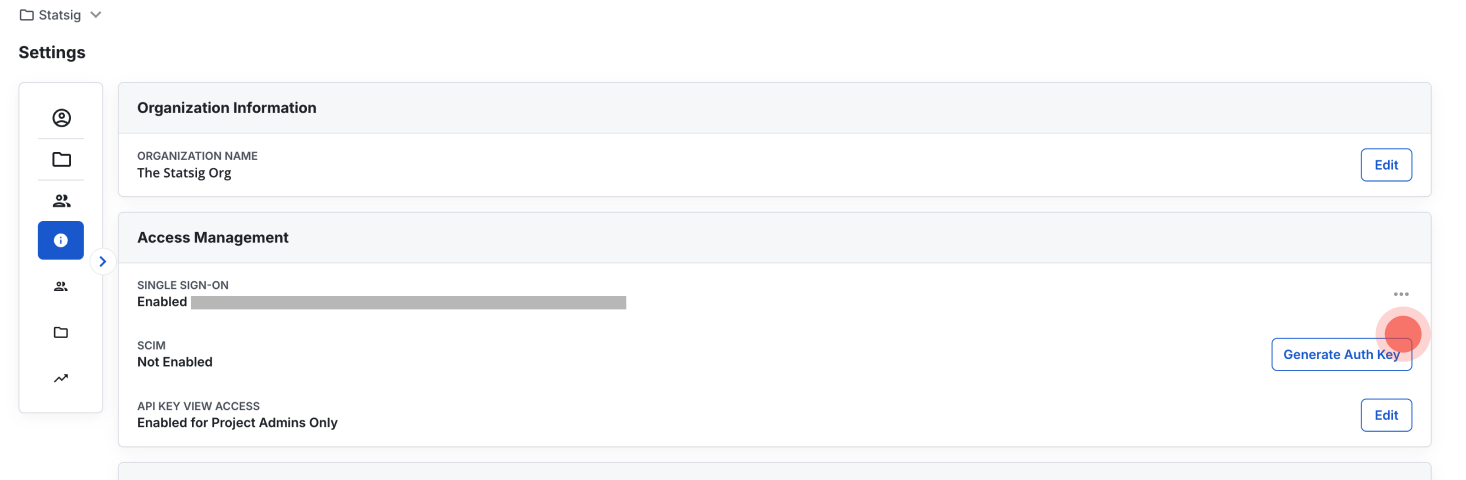
- Navigate to Organization Access Management: Go to Settings > Organization > Organization Info > Access Management.
- Generate a Key: If SCIM is not yet enabled, generate a new authentication key.
- Deactivate the Key: To disable the key, select Deactivate.
- Regenerate the Key: If you suspect the key has been compromised, you can regenerate a new one to replace it.
Current SCIM Offering
Okta
- Push Users. Assigning users to the Statsig application in Okta automatically adds the users as members of your organization in Statsig. Unassigning users deactivates them and wipes all roles/permissions.
- Import Users. Users in Statsig can be imported into Okta and either matched to existing Okta users, or created as new Okta users.
- Import Groups. Import project/team roles as groups in Okta. Note that imported groups cannot be modified in Okta.
- Push Groups. Groups can be pushed to Statsig to update user project/team roles.