

Overview
You can set up a connector between the Statsig MCP server and ChatGPT, allowing you to query experiments, manage feature flags, explore analytics — all directly within ChatGPT’s conversational interface.Installation
- Navigate to “Settings > Apps and Connectors > Advanced Settings” and turn on Developer mode.
Developer mode is currently only available for Plus, Pro, Business, and Enterprise / Edu tiers.
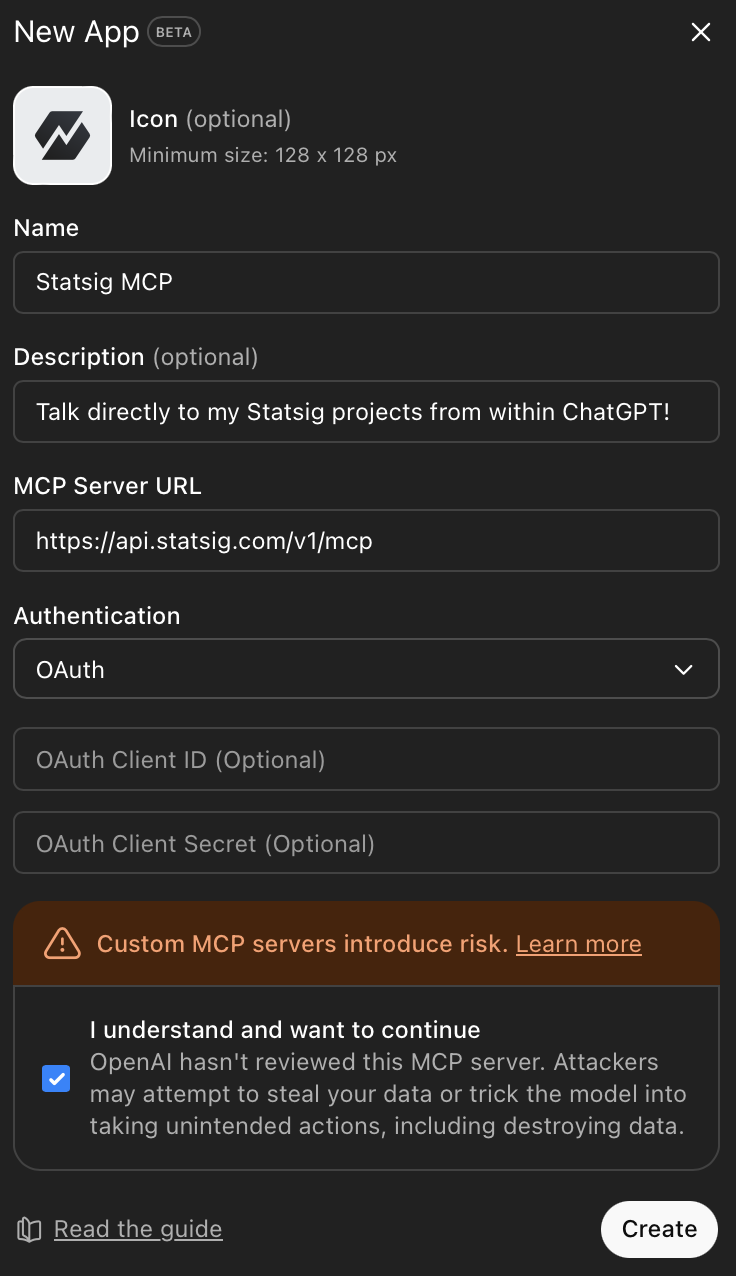
- Once Developer mode is activated, return to the Apps and Connectors settings pane, and in the “Enabled apps and connectors” section, select “Create an app”.
-
Fill out the form to create a new ChatGPT app:
- Add a name (e.g., Statsig MCP) for your tool
- Under “MCP Server URL”, fill in
https://api.statsig.com/v1/mcp - Under “Authentication”, select OAuth.
Using Statsig MCP within ChatGPT
With Statsig MCP configured in ChatGPT, you can:- Explore Experiments: “List all my active experiments”
- Manage Gates: “What gates are currently stale?”
- Configure Dynamic Configs: “Show me the configuration for the dynamic config ‘dynamic-config’”
- Get Insights: “Show me details about the experiment called ‘new-checkout-flow‘“
Next Steps
After installation, you can:- List experiments, gates, and dynamic configs
- Create and update experiments, gates, and configs
- Access your Statsig data directly from Codex